WhatsApp

Turn WhatsApp enquiries into automated leads, bookings, payments, and support workflows

Many businesses receive customer enquiries on WhatsApp, but replies, follow-ups, lead tracking, booking updates, payment reminders, and support routing still happen manually. Crescora AI helps businesses connect WhatsApp-style conversations with AI workflows, forms, notifications, records, human handoff, and analytics so every customer message moves toward a clear business outcome.

Use this guide to understand what WhatsApp API automation means, where businesses use it, and how Crescora AI connects chat with real operational workflows.

Workflow status model

Track the customer journey instead of relying on chat memory.

A practical WhatsApp workflow should show the state of each enquiry, booking, reminder, payment, or handover.

Visible stages

Operational states your team can act on

Crescora AI
Message Received
Intent Classified
Details Captured
Record Created
Team Notified
Follow-Up Scheduled
Outcome Tracked

Article focus

WhatsApp should not be just another manual inbox

Customers message businesses because they expect fast answers. But when every reply depends on staff availability, hot leads go cold, support queues grow, and follow-ups get missed. WhatsApp automation helps businesses respond, qualify, route, and track customer conversations at scale.

Reader outcome

What a strong WhatsApp automation workflow should handle

A strong workflow should capture customer intent, collect required details, answer common questions, send updates, trigger reminders, route complex cases to humans, and track outcomes instead of leaving conversations buried in chat history.

Featured workflow example

Automate WhatsApp enquiries, follow-ups, reminders, and support

Crescora AI helps businesses turn WhatsApp conversations into structured workflows. Capture leads, answer FAQs, collect details, send reminders, trigger payment updates, route support cases, and hand off complex conversations to the right team.
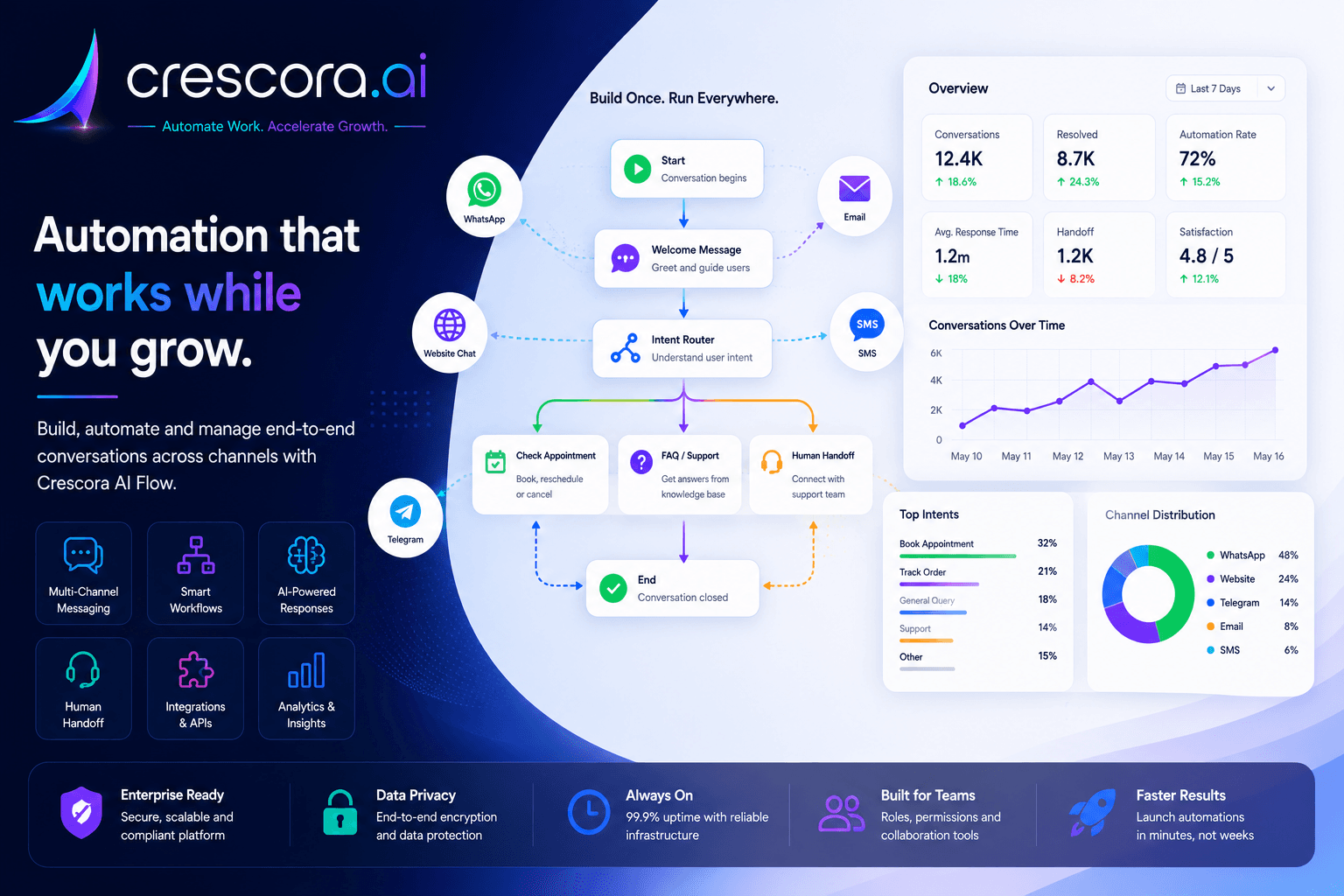
WhatsApp Business API automation explained
Built for businesses that depend on fast replies, clean tracking, and consistent customer follow-up.

Section

Why WhatsApp Business API automation matters

For many businesses, WhatsApp is where customers ask questions, compare services, request prices, book appointments, send documents, ask for payment details, and expect updates. If these conversations are handled manually, the business loses speed, consistency, and visibility.

Customers expect fast replies

When a business replies late, the customer may contact another provider before your team responds.

Manual chats are hard to track

Lead source, requirement, budget, appointment need, payment status, and follow-up notes often stay scattered across conversations.

Teams repeat the same answers daily

Pricing, timings, location, services, availability, documents, booking steps, and payment instructions consume hours.

Follow-ups are easy to miss

Without automation, teams forget who needs a callback, who needs a payment reminder, and who should be escalated.

Section

What WhatsApp API automation can do for businesses

1. Capture leads from WhatsApp conversations

When a customer messages your business, the workflow can collect name, phone number, requirement, location, budget, service interest, and preferred callback time. The lead can be saved as a structured record instead of staying as an untracked chat.

2. Answer common questions automatically

The workflow can answer approved FAQs about pricing, services, working hours, packages, documents, location, process steps, and next actions. This reduces repeated manual replies and improves response speed.

3. Qualify customer intent

The workflow can identify whether the customer wants pricing, appointment booking, product details, admission support, billing help, report status, property enquiry, or human assistance.

4. Send transactional updates and reminders

WhatsApp automation can support reminders and updates such as appointment confirmation, payment reminder, report-ready notification, booking update, callback reminder, or order or status update when the business has configured the right message Workflow.

5. Route complex cases to human teams

If the customer is angry, urgent, high-value, payment-related, support-heavy, or asking something sensitive, the workflow can move the conversation to a human team with context.

6. Connect WhatsApp to business systems

WhatsApp automation becomes more powerful when it connects to records, payment status, booking systems, internal alerts, forms, webhooks, and team queues.

7. Track outcomes

Managers should know how many enquiries came in, how many became leads, which workflows converted, which customers dropped off, and where handoffs or follow-ups are increasing.

Section

Sample WhatsApp lead and support workflow

A practical WhatsApp workflow can look like this: Customer sends WhatsApp message to AI identifies intent to bot collects details to record is created to customer receives next step to team is notified to reminders or follow-ups are scheduled to human handoff if needed to outcome is tracked.

This keeps the conversation active inside a business workflow instead of leaving it buried in a manual inbox.

Next step

Need WhatsApp automation that drives outcomes instead of just replies?

Start with enquiry capture, routing, reminders, and escalation rules first, then expand into payments, bookings, support workflows, and analytics.

Section

How Crescora AI connects WhatsApp automation to the full customer journey

Crescora AI is not only a WhatsApp auto-reply tool. It connects customer conversations with AI intent detection, structured forms, records, notifications, payment steps, human handoff, webhooks, and analytics so every message can move toward a measurable outcome.

Capture

Collect customer name, phone number, requirement, service interest, location, budget, and preferred callback time.

Classify

Identify whether the message is a lead, support question, booking request, payment issue, report query, or escalation case.

Automate

Send approved replies, reminders, confirmations, next steps, and follow-up prompts.

Connect

Use forms, records, APIs, webhooks, payments, and notifications to connect chat with business operations.

Escalate

Move urgent, complex, or high-value conversations to the right team with full context.

Track

Measure enquiries, conversions, drop-offs, handoffs, payment actions, and support workload.

Section

WhatsApp automation with control, not random replies

Businesses should not use WhatsApp automation only to send generic messages. A strong setup needs approved message Workflows, fallback handling, opt-out awareness, delivery tracking, human escalation, and clear business rules.

Crescora AI helps businesses automate WhatsApp conversations while keeping control over what is sent, when it is sent, and who handles exceptions.

Approved workflow logic

Define the exact questions, replies, actions, and escalation rules for each customer journey.

Fallback channels

When WhatsApp delivery is not suitable or a message fails, workflows can use fallback options such as SMS or email where configured.

Human handoff

Move urgent, sensitive, or high-value conversations to sales, support, billing, front desk, or operations teams.

Delivery and outcome visibility

Track message delivery, customer responses, handoffs, records, and workflow outcomes.

Related resources

Explore More WhatsApp Automation Resources

Open the next WhatsApp solution, template, comparison, or pricing page for your rollout.

WhatsApp Automation Solutions

Automate enquiries, lead capture, reminders, payments, support routing, and follow-ups across WhatsApp workflows.

Explore WhatsApp Automation

WhatsApp Workflow Templates

Start with ready-to-customize Workflows for leads, appointments, FAQs, reminders, and human handoff.

View Templates

Crescora AI vs Basic WhatsApp Bots

See why workflow automation is stronger than simple auto-reply chatbots.

Compare Crescora AI

Lead Capture Automation

Turn inbound WhatsApp conversations into qualified leads with structured intake and routing.

See Lead Workflow

Pricing

See rollout options for WhatsApp automation, notifications, support workflows, and human escalation.

View Pricing

FAQ

Frequently asked questions

These are the common questions businesses ask before rolling out WhatsApp Business API automation.

What does WhatsApp Business API automation actually do?

It helps businesses turn inbound WhatsApp messages into structured workflows for lead capture, FAQs, booking, reminders, payment follow-up, support routing, and human escalation instead of handling every conversation manually.

Can WhatsApp automation capture leads and support requests?

Yes. A workflow can collect contact details, understand intent, save a record, notify the right team, and move the customer to the next step based on whether the conversation is sales, support, booking, or billing related.

Can reminders and updates be sent through WhatsApp workflows?

Yes, where the business has configured the right message Workflow and delivery rules. Common use cases include appointment confirmations, payment reminders, booking updates, callback reminders, and support status updates.

What happens when the customer needs a human?

A strong setup should route urgent, sensitive, high-value, or unresolved conversations to the right team with customer context, previous messages, and the reason for escalation.

How do managers know whether WhatsApp automation is working?

Track enquiry volume, lead conversion, follow-up completion, handoff rates, message outcomes, drop-offs, support workload, and completed business actions.

Next step

Ready to automate your WhatsApp customer workflows?

Use Crescora AI to capture WhatsApp enquiries, qualify leads, send reminders, automate support, connect payments or bookings, and route complex cases to your team.

For hospitals, schools, real estate, coaching centers, diagnostics, clinics, agencies, ecommerce, and service businesses.
