
What is no-code chatbot automation?
No-code chatbot automation helps businesses build customer conversation workflows without writing code. Instead of manually replying to every enquiry, booking request, payment follow-up, document request, or support question, businesses can use a visual workflow builder to automate repeatable steps and hand over complex cases to humans.
Use this guide to understand what no-code chatbot automation means, what it can automate first, and how to launch it safely.
Workflow status model
Track the customer journey instead of relying on chat memory.
A practical WhatsApp workflow should show the state of each enquiry, booking, reminder, payment, or handover.
Visible stages
Operational states your team can act on
Article guide
Table of contents
Jump to the part of the article that matches your rollout question.
Article focus
No-code chatbot automation explained
Learn how no-code chatbot automation helps businesses create lead capture, booking, support, payment, document, reminder, and handoff workflows without building custom software from scratch.
Reader outcome
From simple chatbot replies to real workflow automation
This guide explains what no-code chatbot automation means, how it works, what businesses can automate first, and how Crescora AI helps teams launch structured automation safely.
Featured workflow example
Build business chatbots without coding, then automate real workflows.
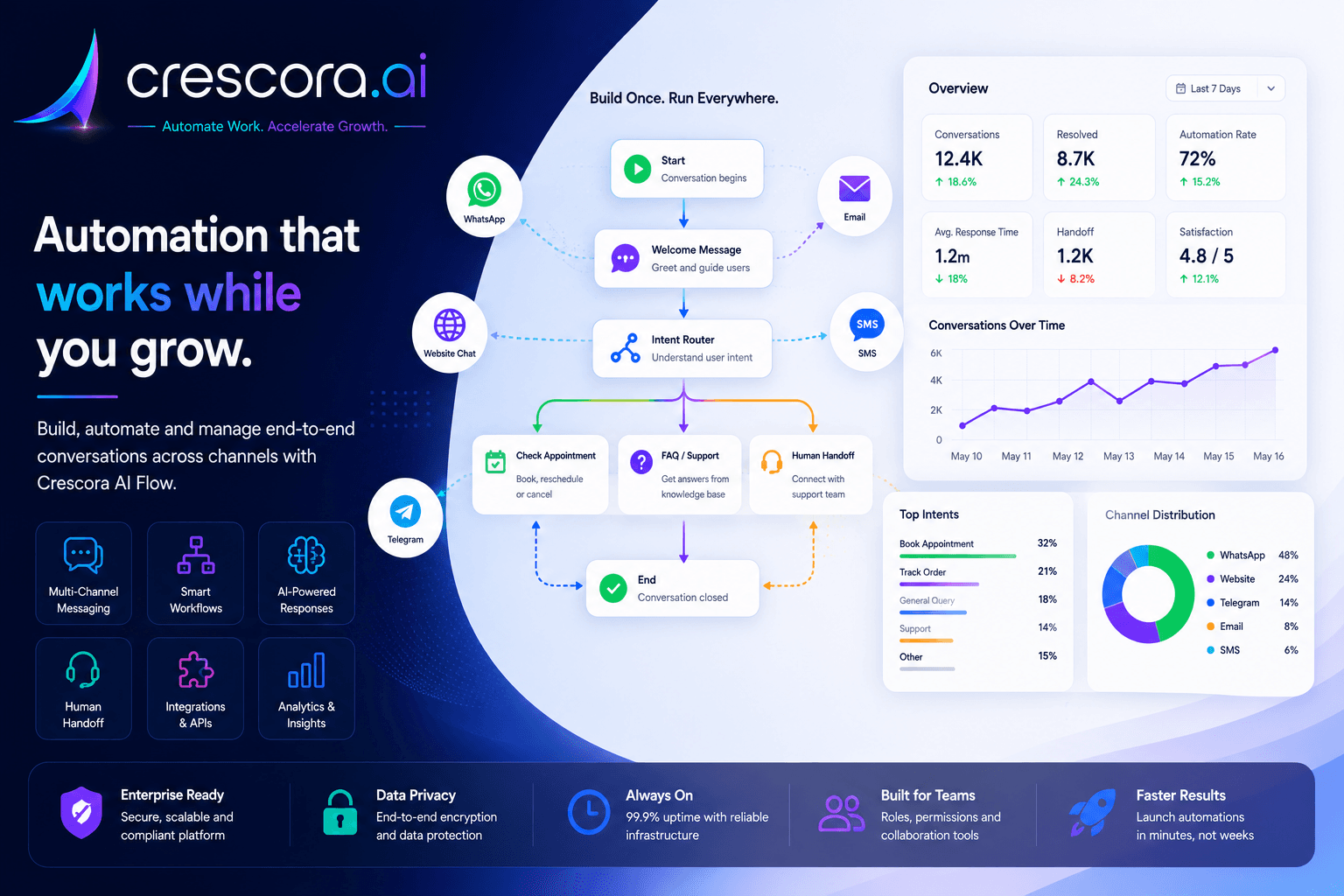
Crescora AI helps teams create no-code chatbot workflows for lead capture, appointment booking, reminders, payment follow-ups, document collection, customer support, human handoff, and workflow tracking.
Section
What is no-code chatbot automation?
No-code chatbot automation is the process of building chatbot workflows without writing code.
Instead of asking developers to build every conversation, integration, form, reminder, and handoff manually, a business can use a visual builder to create the customer journey.
The goal is not only to create a chatbot. The goal is to automate repeated business conversations and turn them into clear outcomes.
- Capture enquiries.
- Ask qualification questions.
- Book appointments.
- Send reminders.
- Collect documents.
- Follow up on payments.
- Answer common questions.
- Route support issues.
- Escalate complex cases to humans.
- Store customer records.
- Track workflow outcomes.
Section
How no-code chatbot automation works
A no-code chatbot automation platform usually works through a visual workflow builder.
The business defines what the customer asks, what details should be collected, what choices should be shown, what messages should be sent, when a reminder should happen, when a payment or document is needed, when a human should take over, and what outcome should be tracked.
A simple workflow can look like this: Customer Message to Intent Detection to Details Capture to Workflow Action to Reminder or Handoff to Outcome Tracking.
Example: appointment booking
A customer asks for an appointment, the chatbot collects name, phone number, service type, preferred date and time, confirms the request, schedules a reminder, and hands over to staff if the question becomes complex.
What the builder controls
The workflow controls the data capture, next-step choice, reminder timing, fallback path, and final outcome instead of leaving every step to manual replies.
Why this matters
No-code automation lets operations teams shape the customer journey directly instead of waiting on custom development for every change.
Section
No-code chatbot vs normal chatbot
A normal chatbot usually answers questions. A no-code chatbot automation system completes business steps.
The difference is simple: chatbot replies answer questions, while workflow automation moves the customer toward a result.
Next step
Need the fastest path to no-code automation that actually ships?
Start with one workflow, prove the value, and then expand into WhatsApp, website chat, reminders, payments, documents, support, and dashboards.
Section
What businesses can automate first
Businesses should not automate everything on day one. Start with one repeated workflow that wastes time or loses revenue.
Start with the workflow that creates the most manual work or missed opportunities.
Lead capture
Capture enquiries, qualification details, and callback readiness before leads go cold.
Appointment booking
Reduce back-and-forth around dates, times, reminders, and rescheduling.
Customer support FAQs
Reduce repeated support questions and route unresolved cases faster.
Payment reminders
Chase pending payments with structured reminders and escalation paths.
Document collection
Request files, track missing documents, and route unclear submissions.
Follow-up reminders
Recover missed replies, demos, visits, or callbacks with scheduled reminders.
Human handoff
Move complex or sensitive conversations to people with context.
Feedback collection
Close the loop after bookings, support, visits, or completed workflows.
Status updates
Keep customers informed without forcing staff to answer every update request.
Section
Best no-code chatbot automation use cases
Lead capture automation
Capture name, phone number, email, requirement, budget, location, urgency, preferred callback time, lead source, and next action for cleaner sales handover.
Appointment booking automation
Collect customer name, mobile number, service type, department or staff preference, preferred date and time, location, and confirmation status, then send reminders or route exceptions.
Customer support automation
Handle FAQ replies, issue category selection, customer detail collection, ticket routing, status updates, escalation, human handoff, and feedback collection.
Payment reminder automation
Run payment due reminders, payment link sharing, transaction reference capture, payment status collection, failed payment recovery, overdue escalation, and billing handoff.
Document collection automation
Request KYC files, admission forms, insurance papers, reports, onboarding documents, or receipts with reminder logic and human review for unclear submissions.
Reminder and follow-up automation
Send reminders for appointments, payments, pending documents, missed replies, demo bookings, service visits, renewals, follow-up calls, and feedback requests.
Human handoff automation
Hand over when the customer is angry, the issue is urgent, the request is complex, payment failed, the document is unclear, or the case is high value or sensitive.
Workflow analytics and visibility
Track total conversations, leads captured, appointments booked, payments pending, documents submitted, FAQs resolved, tickets created, handoffs created, follow-ups sent, drop-off points, and completed workflows.
Section
Benefits of no-code chatbot automation
No-code chatbot automation helps businesses launch faster without custom development, reduce repetitive manual replies, capture better customer details, improve response speed, send consistent follow-ups, route serious cases to the right team, track every workflow outcome, and scale customer communication without adding more staff.
The biggest benefit is speed. Businesses can start with one workflow, prove value, and expand step by step.
Section
What a good no-code chatbot builder should include
A serious no-code chatbot automation platform should support the workflow building blocks teams need in production, not only simple reply trees.
Crescora AI supports these categories through node families for core conversation, logic and control, timing and reliability, integrations, communication, data and process, domain operations, and AI nodes.
- Visual workflow builder.
- Multi-channel support.
- Lead capture forms.
- Appointment booking.
- Payment follow-up.
- Document intake.
- FAQ and knowledge base support.
- Human handoff.
- Fallback paths.
- Reminder scheduling.
- Records and customer data.
- Analytics and tracking.
- Role-based controls.
- Template messages.
- Integration support.
- Safe publishing and versioning.
Section
How Crescora AI helps
Crescora AI helps businesses build, operate, and improve no-code chatbot automation workflows.
The value is simple: faster launches, fewer missed enquiries, less manual follow-up, cleaner handoff, better workflow visibility, and more completed customer actions.
- Visual workflow building.
- WhatsApp automation.
- Website chat automation.
- Lead capture.
- Appointment booking.
- Payment follow-up.
- Document collection.
- FAQ automation.
- AI-grounded responses.
- Human handoff.
- Agent console.
- Records.
- Scheduling.
- Notifications.
- Analytics.
- Governance and controls.
Section
Recommended rollout plan
Step 1: Choose one workflow
Start with the workflow causing the most manual work or lost revenue, such as lead capture, appointment booking, payment reminder, document collection, or customer support FAQ.
Step 2: Map the customer journey
Define what the customer asks, what data must be captured, what options should be shown, and what the final outcome should be.
Step 3: Add fallback and handoff
Every important workflow should include a fallback path and a human handoff path.
Step 4: Launch with one channel
Start with website chat or WhatsApp based on where your customers already talk to you.
Step 5: Track results
Measure leads, bookings, payments, support requests, handoffs, drop-offs, and completed workflows.
Step 6: Expand
After the first workflow works, expand into reminders, payments, documents, CRM sync, support, and dashboards.
Section
Before and after no-code chatbot automation
Section
Industries that can use no-code chatbot automation
Hospitals and clinics
Appointment booking, doctor availability, report status, payment reminders, document collection, and front-desk handoff.
Real estate
Lead qualification, project sharing, site visit booking, sales rep handover, and post-visit follow-up.
Education and coaching centers
Course enquiries, demo class booking, admission follow-up, fee reminders, document collection, and counsellor routing.
Service businesses
Booking requests, technician visits, payment follow-up, customer updates, support, and feedback collection.
Diagnostics and labs
Test booking, home sample collection, report-ready notifications, payment follow-up, and report support.
Insurance and finance
KYC collection, policy questions, claim status, document reminders, advisor routing, and payment follow-up.
Ecommerce and support teams
Order status, FAQs, returns, refunds, complaints, support tickets, and customer feedback.
Related links
Related pages to explore next
Open the solution, workflow, template, pricing, or industry page that matches your next question.
AI Chatbot Solution
Deploy chatbot workflows across website chat, WhatsApp, and social messaging with routing, support, and follow-up.
Explore AI Chatbot SolutionWorkflow Automation
Automate customer journeys from first message to completed business outcome.
Explore Workflow AutomationWhatsApp Automation
Turn WhatsApp enquiries into lead capture, booking, reminders, payments, support, and handover workflows.
Explore WhatsApp AutomationTemplates
Start faster with pilot-ready workflow templates for leads, bookings, payments, documents, and support.
View TemplatesCompare Crescora AI
See why Crescora AI is built for workflow automation, not just basic chatbot replies.
Compare Crescora AIFAQ
Frequently asked questions
These are the common questions buyers ask before choosing a no-code chatbot automation platform.
What is no-code chatbot automation?
No-code chatbot automation lets businesses build chatbot workflows without writing code. It helps automate lead capture, appointments, payments, documents, support, reminders, and human handoff.
Is no-code chatbot automation only for simple bots?
No. A good no-code chatbot platform can support structured workflows, integrations, reminders, records, handoff, analytics, and multi-step customer journeys.
Can no-code chatbot automation work on WhatsApp?
Yes. No-code chatbot automation can work on WhatsApp depending on setup, templates, provider configuration, and customer opt-in rules.
Can no-code chatbot automation work on websites?
Yes. Website chat is one of the best places to start because it captures visitors while they are actively exploring your business.
What should I automate first?
Start with the workflow causing the most business leakage: missed leads, appointment booking, payment follow-up, document collection, or repeated support questions.
Can no-code chatbot automation replace my team?
No. It should reduce repetitive work and help your team focus on complex, urgent, or high-value conversations.
Can Crescora AI support human handoff?
Yes. Crescora AI supports handoff and agent console operations so human teams can take over conversations with context.
Is no-code chatbot automation useful for small businesses?
Yes. Small businesses can use it to respond faster, reduce manual workload, capture more leads, and create structured follow-ups without building custom software from scratch.
Next step
Ready to build chatbot automation without coding?
Tell us how your business currently handles enquiries, bookings, payments, documents, support, reminders, and handoffs. We will map your workflow and show the fastest Crescora AI rollout path.
Start with one workflow. Prove value. Expand into WhatsApp, website chat, reminders, payments, documents, support, and dashboards.
