Healthcare

Build a hospital demo chatbot that automates appointments, reports, billing, and patient support

A strong hospital demo chatbot should not only answer FAQs. It should show how patients can book appointments, check doctor availability, ask about lab reports, explore health packages, get billing or insurance help, receive reminders, and reach hospital staff when the case is urgent or sensitive. Crescora AI helps hospitals turn these patient journeys into controlled AI workflows across web, WhatsApp-style messaging, and configured business channels.

Use this guide to understand what a hospital demo should prove, how to structure the workflow, and where patient convenience must stay aligned with safety and staff control.

Workflow status model

Track the customer journey instead of relying on chat memory.

A practical WhatsApp workflow should show the state of each enquiry, booking, reminder, payment, or handover.

Visible stages

Operational states your team can act on

Crescora AI
Intent Selected
Patient Details Captured
Workflow Routed
Reminder Scheduled
Payment Step Ready
Handover Created
Outcome Tracked

Article guide

What you'll learn

Open the hospital-demo topic that matches the patient journeys and operational questions your healthcare team wants to show.

Article focus

A hospital demo bot must show real operations, not just chat replies

Hospital teams do not need another generic chatbot. They need to see how automation reduces calls, captures patient details, confirms appointments, answers repeated questions, routes sensitive cases, and gives staff visibility into patient requests.

Reader outcome

What a hospital demo chatbot should prove

A strong demo should prove that the bot can guide patients, collect accurate details, automate routine journeys, protect sensitive cases, and hand over to hospital teams when human support is required.

Featured workflow example

Show hospitals how patient workflows can run faster

Crescora AI helps hospitals and clinics automate appointment booking, doctor availability, lab report status, billing support, insurance queries, admission help, health packages, reminders, and human handoff all inside one controlled workflow.
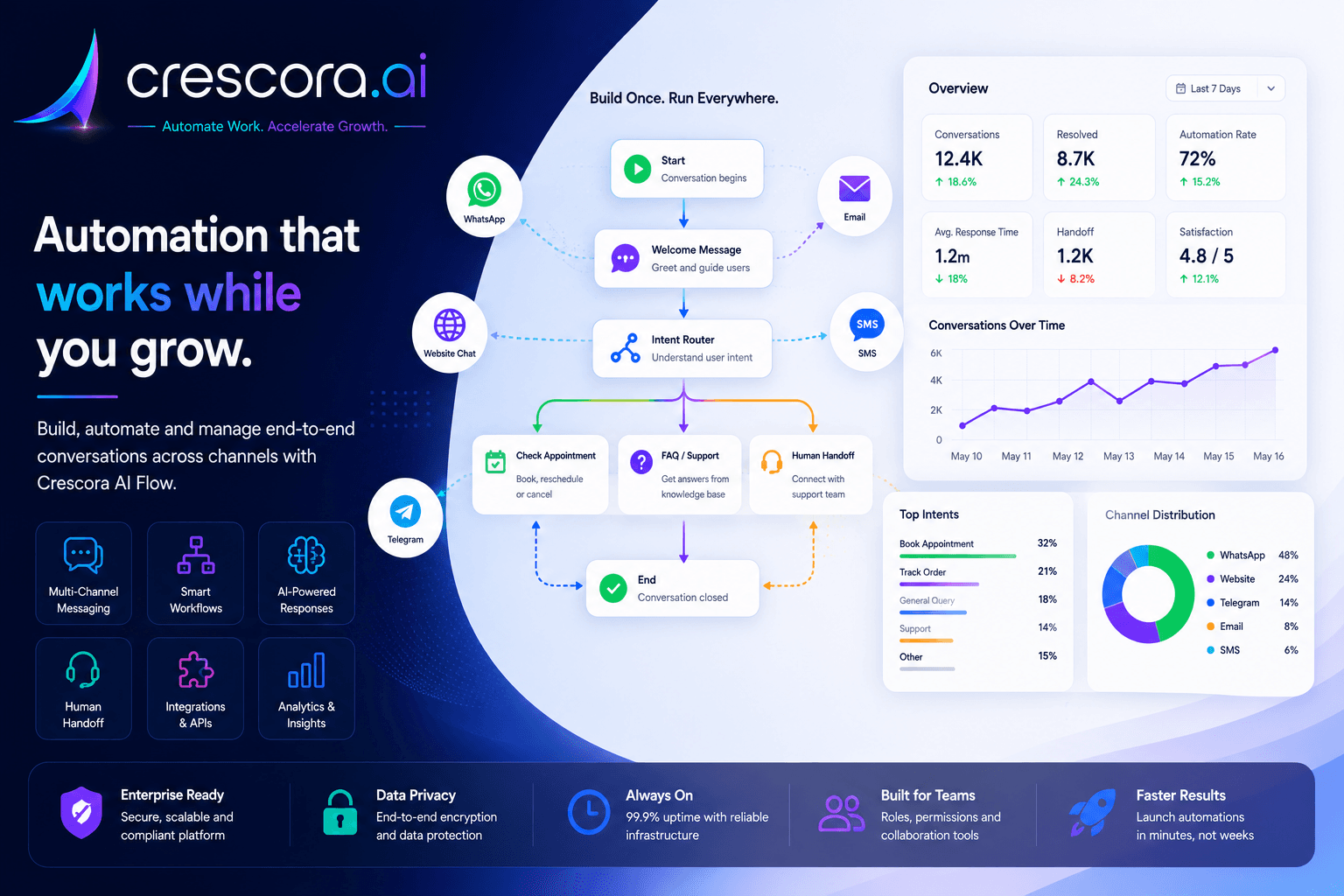
How to build a hospital demo chatbot
Built for hospital demos that need to show patient convenience, front desk efficiency, and safe escalation.

Section

Why a hospital demo chatbot matters

Hospitals receive repeated patient questions every day. Patients ask about appointments, doctors, reports, timings, billing, packages, insurance, admission, location, and emergency help. A demo chatbot helps hospital decision-makers see how these requests can be handled faster without depending only on phone calls and front desk staff.

Front desk teams are overloaded

Hospital staff spend hours answering repeated questions about timings, doctors, reports, fees, and availability.

Patients expect quick answers

Delayed replies create frustration and may push patients to call repeatedly or choose another provider.

Manual follow-ups are missed

Appointment reminders, report updates, payment nudges, and callback requests are easy to forget when handled manually.

Sensitive cases need human escalation

Emergency, admission, insurance, billing disputes, and complex medical queries should move to hospital staff with context.

Section

What to include in a hospital demo chatbot

1. Welcome and patient intent selection

Start with a clear menu that helps patients choose what they need: book appointment, check doctor availability, lab report status, health packages, billing help, insurance support, admission help, hospital location, emergency support, or talk to staff.

2. Appointment booking workflow

Let the patient select department, doctor, date, preferred slot, visit type, and basic details, then confirm the booking request and communicate the next step clearly.

3. Doctor availability workflow

Let patients choose a department and see available doctors, consultation timing, location, and next available slot to reduce repeated availability calls.

4. Lab report status workflow

Collect mobile number and report ID, then check or simulate report status, share the next step, and route delayed or unavailable reports to lab support.

5. Billing and payment help

Handle consultation fee questions, pending bill, payment method, invoice help, refund issues, or package payment, then guide the patient or escalate disputes to billing staff.

6. Insurance and admission support

Explain required documents, collect patient details, share process steps, and hand complex insurance or admission cases to the correct hospital team.

7. Health package discovery

Use structured package cards or choices to show health packages, inclusions, pricing details, fasting instructions, booking options, and callback requests.

8. Emergency and safety escalation

Show visible emergency guidance and route high-risk requests away from normal bot handling so the demo proves trust and safety discipline.

9. Human handoff workflow

Transfer sensitive, emergency, billing, insurance, admission, or unresolved report cases to the right hospital team with collected context.

10. Reminder and follow-up workflow

Show appointment reminders, follow-up consultation reminders, payment reminders, report-ready updates, and callback scheduling to demonstrate long-term automation value.

Section

Example hospital demo workflow map

A practical hospital workflow can look like this: Patient opens chat to selects need to appointment, report, billing, insurance, or admission route to details collected to record created to payment, reminder, or support step to human handoff if needed to outcome tracked.

This helps hospitals see how one chatbot demo can represent the patient journey instead of only showing isolated replies.

Next step

Need a hospital demo that proves real patient workflow value?

Start with appointment booking, reports, billing, insurance, and emergency-aware routing first, then expand into broader patient communication and reminder workflows.

Section

How Crescora AI connects the hospital demo journey

Crescora AI connects the complete hospital patient journey. A patient request can move from chat intake to intent detection, appointment booking, payment step, report status, document collection, reminder, staff handoff, and outcome tracking in one workflow.

Capture

Collect patient name, mobile number, department, location, appointment need, report ID, package interest, or billing issue.

Route

Send requests to appointment, reports, billing, insurance, admission, emergency, or support workflows.

Automate

Confirm bookings, share package details, send reminders, trigger payment steps, and answer common questions.

Escalate

Move urgent, sensitive, unresolved, or high-value cases to hospital staff with full context.

Track

Measure appointment requests, report queries, payment steps, handovers, drop-offs, and patient outcomes.

Improve

Use repeated patient questions and workflow drop-offs to improve hospital automation over time.

Section

Hospital demo automation with safety and control

Hospital automation must be clear, safe, and controlled. A demo chatbot should not pretend to diagnose patients or replace hospital staff. It should automate routine communication, collect structured details, guide patients to the right next step, and escalate emergency or sensitive cases to humans.

Clear patient journeys

Each menu option should lead to a specific outcome: booking, report status, billing help, package enquiry, admission support, or staff handoff.

Emergency-aware routing

Emergency requests should show immediate guidance and move away from normal bot handling.

Human handoff for sensitive cases

Billing disputes, insurance questions, admission cases, urgent symptoms, and unresolved issues should reach staff.

Operational visibility

Hospital teams should see what patients requested, what details were collected, where handoff happened, and which workflows need improvement.

Related resources

Explore More Healthcare Automation Resources

Open the next healthcare, template, comparison, or pricing page for your hospital automation rollout.

Hospital Automation Solutions

Automate appointments, reports, billing, insurance, admission, packages, and patient support.

Explore Hospital Automation

Hospital Workflow Templates

Start with ready-to-customize workflows for OPD booking, reports, billing, and health packages.

View Hospital Template

Crescora AI vs Basic Hospital Chatbots

See why workflow automation is stronger than simple FAQ replies.

Compare Crescora AI

Healthcare Automation

See how healthcare workflows connect patient enquiries, booking, reports, billing, and handoff.

Explore Healthcare Automation

Pricing

See rollout options for hospital workflows, channels, reminders, handoff, and patient operations.

View Pricing

FAQ

Frequently asked questions

These are the common questions hospitals ask before building a demo chatbot.

What should a hospital demo chatbot include first?

Start with the journeys hospitals handle every day: appointment booking, doctor availability, report status, billing help, insurance or admission support, reminders, and safe escalation to staff.

Why is a hospital chatbot demo different from a normal FAQ bot?

Because the demo must show how patient requests move through real workflows with records, reminders, payment steps, handoff, and safety messaging instead of only giving generic replies.

Can a hospital demo show emergency handling safely?

Yes. The safe pattern is to show visible emergency guidance and route those requests out of normal bot handling toward hospital staff or emergency contact paths.

What patient details should the demo capture?

Capture only the details needed for the next step, such as name, mobile number, department, appointment preference, report ID, billing issue, or package interest, depending on the workflow path.

How do hospitals know whether the demo shows enough business value?

A good demo should clearly show front-desk workload reduction, faster patient response, cleaner routing, better reminders, safer escalation, and visibility into patient request outcomes.

Next step

Ready to build a hospital demo chatbot that wins trust?

Use Crescora AI to demonstrate appointment booking, doctor availability, lab report status, billing support, insurance help, admission guidance, reminders, and human handoff in one hospital-ready workflow.

For hospitals, clinics, diagnostics, labs, and healthcare service teams.
