
Customer support automation ideas for Indian businesses
Indian businesses lose time and customers when support teams answer the same questions manually, miss WhatsApp messages, delay follow-ups, and escalate issues without context. Crescora AI helps businesses automate FAQs, support intake, ticket routing, payment queries, appointment updates, document follow-ups, human handover, and customer status tracking.
Use this guide to decide which support workflow your team should automate first: FAQs, WhatsApp intake, tickets, payments, documents, escalation, or handover.
Workflow status model
Track the customer journey instead of relying on chat memory.
A practical WhatsApp workflow should show the state of each enquiry, booking, reminder, payment, or handover.
Visible stages
Operational states your team can act on
Article guide
Table of contents
Jump to the part of the article that matches your rollout question.
Article focus
Customer support automation for Indian businesses
Learn how Indian businesses can automate repeated support questions, WhatsApp enquiries, issue intake, support routing, ticket creation, reminders, and human handover using structured workflows.
Reader outcome
Turn support conversations into clear outcomes
This guide explains practical support automation ideas for businesses that want faster replies, fewer repeated questions, better escalation, and cleaner customer follow-up.
Featured workflow example
Resolve customer questions faster with automated support workflows.
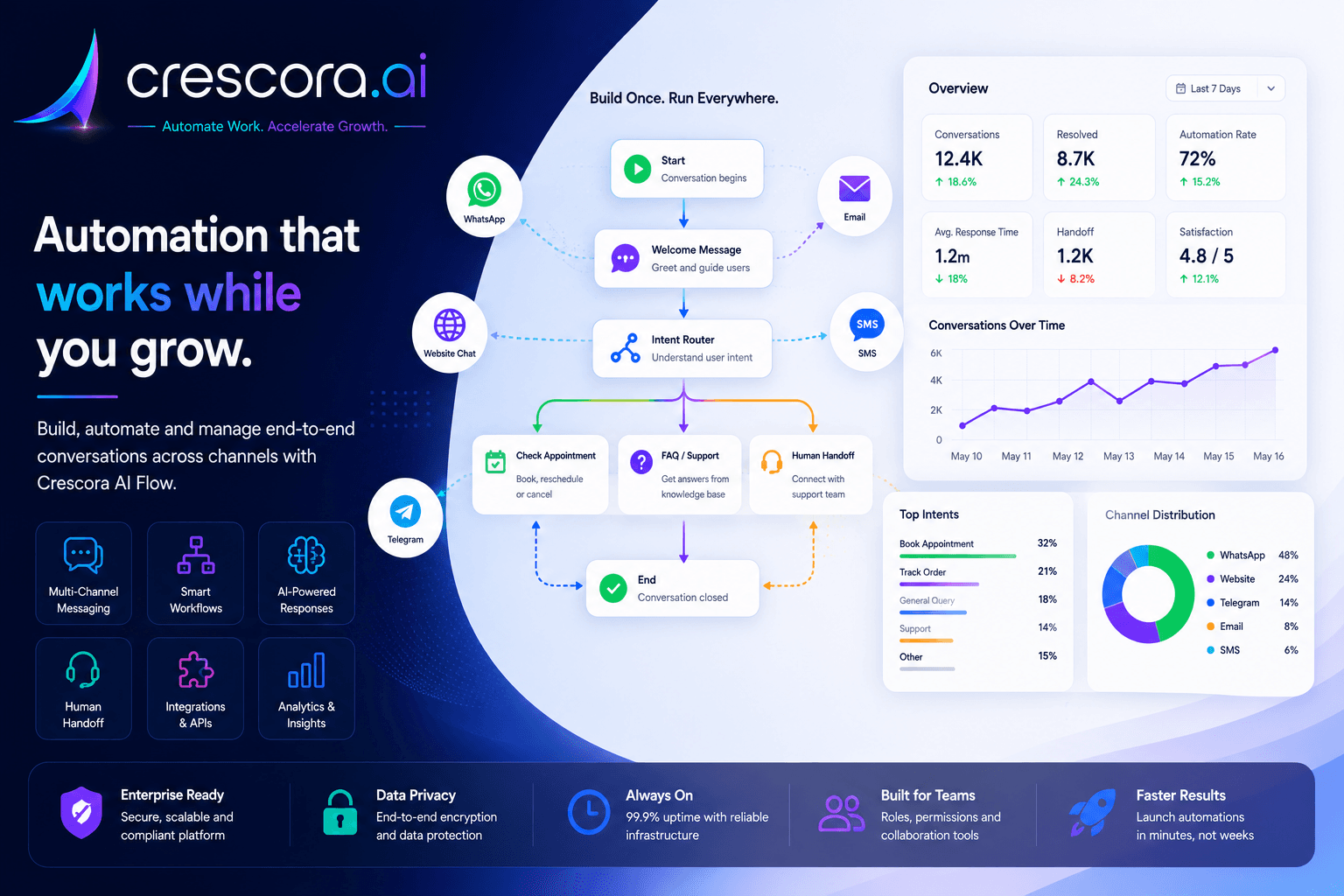
Crescora AI helps Indian businesses automate FAQ replies, issue triage, WhatsApp support, ticket routing, payment queries, appointment updates, document follow-ups, and human handover with full conversation context.
Section
What is customer support automation?
Customer support automation means using workflows to handle repeated support conversations, collect customer details, route issues to the right team, send status updates, and escalate complex cases to humans.
It is not only about chatbot replies. A good support automation system should help the business move every support conversation toward a clear result.
The goal is simple: faster support, fewer repeated questions, cleaner escalation, and better visibility.
- FAQ replies.
- Issue category detection.
- Customer detail collection.
- Ticket creation.
- Payment query routing.
- Order or service status updates.
- Appointment support.
- Document follow-up.
- Complaint escalation.
- Human handover.
- Support status tracking.
- Customer feedback collection.
Section
Why Indian businesses need support automation
Many Indian businesses depend heavily on WhatsApp, phone calls, Instagram messages, website forms, and manual support teams. Customers expect fast replies, but support teams often get overloaded.
Customer support automation solves this by creating a structured path for every support request.
- Customers ask the same questions every day.
- WhatsApp messages are missed during busy hours.
- Support teams manually ask for order ID, phone number, issue type, or screenshots.
- Payment and refund questions are routed slowly.
- Complaint handling depends on individual staff.
- Customers repeat the same issue after handover.
- Managers cannot track how many issues are pending, escalated, or resolved.
- Support quality changes from person to person.
Section
Best customer support automation ideas
Indian businesses should not automate everything at once. Start with the support workflow that creates the most repeated manual work.
Each workflow should have one clear goal: reduce manual work and improve customer experience.
FAQ automation
Handle repeated questions with approved answers and route customers to the right next step.
WhatsApp support intake
Capture support requests, collect the right details, and reduce missed messages.
Ticket creation
Turn support chats into trackable cases with ownership and status.
Payment and billing query routing
Collect payment references and move billing cases to the right team faster.
Order or service status updates
Reduce repeated status questions with structured request collection and updates.
Appointment support
Handle confirmations, reschedules, cancellations, reminders, and booking fee questions.
Document collection support
Request missing files, remind customers, and route unclear submissions for review.
Complaint escalation
Escalate serious or delayed cases with urgency, evidence, and conversation summary.
Human handover
Move complex conversations to a person with full context instead of starting over.
Feedback and review collection
Capture support quality signals after each issue is resolved.
Support analytics and dashboards
Track support load, escalations, closures, and unresolved conversations.
Next step
Need the fastest path to cleaner support operations?
Start with one support workflow that creates the most repeated manual work, prove the value, and then expand into tickets, payments, documents, handover, feedback, and dashboards.
Section
FAQ automation for repeated questions
FAQ automation is the easiest support automation workflow to start with.
Instead of making staff answer the same questions manually, Crescora AI can respond with approved answers and guide customers to the next step.
- What are your timings?
- What is the price?
- Where are you located?
- What documents are required?
- How do I book an appointment?
- What is the refund policy?
- When will my order be delivered?
- How do I contact support?
- What services do you provide?
Section
WhatsApp support automation
In India, many customers prefer WhatsApp for support. They use it for questions, complaints, payment updates, appointment changes, order status, and document sharing.
An example workflow looks like this: Customer Message to Issue Category to Required Details to FAQ Answer or Ticket Created to Human Handover to Status Update to Resolution Tracking.
- New support request capture.
- Issue category selection.
- Order ID or reference number collection.
- Payment query routing.
- Appointment support.
- Document request follow-up.
- Complaint escalation.
- Status update messages.
- Human handover.
Section
Ticket creation and escalation workflows
Many support teams lose context because issues are handled inside chat without structured ticket creation.
Not every support request should go to the same team. Routing rules help businesses avoid random forwarding and reduce delay.
Ticket details to capture
Collect customer name, phone number, email, issue category, order ID, invoice ID, appointment ID, payment reference, screenshot or document, urgency, callback time, and issue summary.
Routing examples
Billing issues can go to the billing team, payment failures to finance, appointment changes to the front desk, technical problems to support, and complaints to the escalation team.
Business result
Support requests become trackable, teams know who owns the issue, and customers receive clearer status updates.
Section
Payment, order, and appointment support
Payment questions, order status requests, service updates, and booking changes create a large share of support workload for Indian businesses.
Crescora AI can collect the required identifiers, route the issue correctly, and keep the customer updated without forcing staff to repeat the same intake work.
Payment and billing support
Capture payment reference, invoice ID, transaction ID, screenshot, phone number, and payment status before routing to billing or finance.
Order and service status
Collect order ID, service request ID, phone number, or customer details and route the request for status updates or assignment visibility.
Appointment and booking support
Handle confirmation, rescheduling, cancellation, reminder messages, no-show follow-up, booking fee support, location sharing, and staff handover.
Section
Human handover with full context
Automation should not block customers when they need a human.
A good handover should include customer name, phone number, issue category, conversation summary, urgency level, last action taken, uploaded files or references, and the recommended next step.
- Angry customers.
- Urgent issues.
- Payment disputes.
- Refund cases.
- Technical failures.
- Sensitive questions.
- High-value sales or support cases.
- Repeated fallback cases.
- Unclear customer intent.
Section
Support automation by industry
Ecommerce businesses
Automate order status, delivery updates, return requests, refund questions, payment issues, and complaint routing.
Hospitals and clinics
Automate appointment questions, doctor availability, report status, payment support, document collection, and front-desk handover.
Coaching centers and EdTech
Automate course FAQs, demo class booking, fee questions, admission support, document collection, and counsellor routing.
Real estate businesses
Automate project enquiries, brochure requests, site visit support, sales handover, and post-visit follow-ups.
Service businesses
Automate service requests, technician visit updates, booking support, payment follow-up, and customer feedback.
Insurance and finance businesses
Automate policy questions, document collection, claim status, KYC follow-up, and advisor handover.
SaaS and software businesses
Automate product FAQs, onboarding questions, bug reports, feature requests, account support, and technical escalation.
Section
How Crescora AI helps support teams
Crescora AI helps businesses turn customer support conversations into structured workflows.
The value is simple: faster replies, fewer repeated questions, cleaner support routing, better team handover, more visibility into unresolved issues, and a better customer experience.
- Website chat support.
- WhatsApp support automation.
- FAQ automation.
- Issue triage.
- Ticket routing.
- Payment support.
- Document collection.
- Appointment support.
- Human handover.
- Reminder automation.
- Feedback collection.
- Support analytics.
- Conversation tracking.
Section
Before and after support automation
Section
What to measure after launching support automation
Support automation is incomplete without visibility.
These metrics help managers understand whether support quality is improving.
Total support requests
Track how many issues enter the workflow.
FAQ resolved cases
Measure how many repeated questions are answered without manual effort.
Tickets created
See how many support requests become structured cases.
Pending and escalated issues
Track how much work is still open and where escalation pressure is growing.
Average response time
Measure how quickly customers receive a useful first response.
Repeated questions
Spot the topics creating unnecessary manual work.
Payment and document support cases
Understand how much support volume comes from billing and paperwork.
Customer satisfaction
Track feedback quality after issues are resolved.
Closed and unresolved conversations
Measure resolution discipline and backlog leakage.
Related links
Related pages to explore next
Open the solution, workflow, template, pricing, or industry page that matches your next question.
Customer Support Automation
Resolve repeated questions, capture support issues, create handover paths, and route complex cases to the right team.
Explore Support AutomationWhatsApp Automation Workflows
Turn WhatsApp messages into support, booking, payment, document, and follow-up workflows.
Explore WhatsApp AutomationAI Chatbot Solution
Deploy AI chatbot workflows across website chat, WhatsApp, and social messaging with routing and support logic.
Explore AI Chatbot SolutionHuman Handoff Automation
Move urgent, complex, or sensitive conversations to the right team with full context.
See Human Handoff WorkflowFAQ
Frequently asked questions
These are the common rollout questions businesses ask before automating customer support workflows.
What is customer support automation?
Customer support automation uses workflows to answer repeated questions, collect issue details, route tickets, send status updates, and escalate complex cases to human teams.
Why do Indian businesses need support automation?
Indian businesses often handle support through WhatsApp, phone calls, forms, and manual follow-ups. Automation helps reduce missed messages, repeated replies, delayed routing, and support overload.
Can support automation work on WhatsApp?
Yes. WhatsApp support automation can capture issue details, answer FAQs, send reminders, route cases, collect documents, and hand over complex cases to staff.
Can automation replace support staff?
No. The best automation reduces repetitive work and helps support staff focus on urgent, sensitive, and complex customer issues.
What support workflow should I automate first?
Start with the workflow creating the most repeated manual work: FAQs, WhatsApp support intake, payment queries, order status, appointment support, or complaint escalation.
Can Crescora AI create support tickets?
Yes. Crescora AI can collect support details and route cases into ticket, queue, CRM, sheet, or internal workflow systems depending on rollout scope.
Can Crescora AI handle human handover?
Yes. Crescora AI can hand over complex conversations to human teams with customer details, issue summary, urgency, and conversation history.
Can support analytics be tracked?
Yes. Support workflows can track FAQ resolution, ticket volume, handovers, escalations, pending cases, and resolved conversations.
Next step
Ready to automate customer support for your business?
Tell us how your team currently handles WhatsApp messages, repeated questions, payment queries, document follow-ups, complaints, tickets, and human escalation. We will map your support workflow and show the fastest Crescora AI rollout path.
Start with one support workflow. Prove value. Expand into FAQ automation, tickets, payments, documents, handover, feedback, and dashboards.
