Service

Practical workflow automation examples that help service businesses save time and win more customers

Service businesses lose time when enquiries, bookings, follow-ups, payments, documents, support requests, and internal handoffs are handled manually. Crescora AI helps teams automate repeatable customer journeys while keeping human control for urgent, high-value, or sensitive cases.

Use this guide to understand where service businesses lose time, which workflows create the most operational drag, and how automation connects the full customer journey.

Workflow status model

Track the customer journey instead of relying on chat memory.

A practical WhatsApp workflow should show the state of each enquiry, booking, reminder, payment, or handover.

Visible stages

Operational states your team can act on

Crescora AI
Enquiry Captured
Intent Classified
Record Created
Team Notified
Task Scheduled
Handover Created
Outcome Tracked

Article focus

Service businesses need workflows, not just chat replies

A customer enquiry often starts in chat, but the real work happens after that: collecting details, assigning ownership, booking a slot, sending reminders, taking payment, requesting documents, and following up until the customer gets the outcome.

Reader outcome

What a strong service workflow should handle

A strong automation workflow should capture customer intent, collect required details, route the request, trigger reminders, notify the right team, escalate exceptions, and track outcomes from first message to final resolution.

Featured workflow example

Automate the work between first enquiry and final outcome

Crescora AI helps service businesses turn customer conversations into structured workflows for lead capture, appointment booking, payments, documents, support routing, follow-ups, and human handoff.
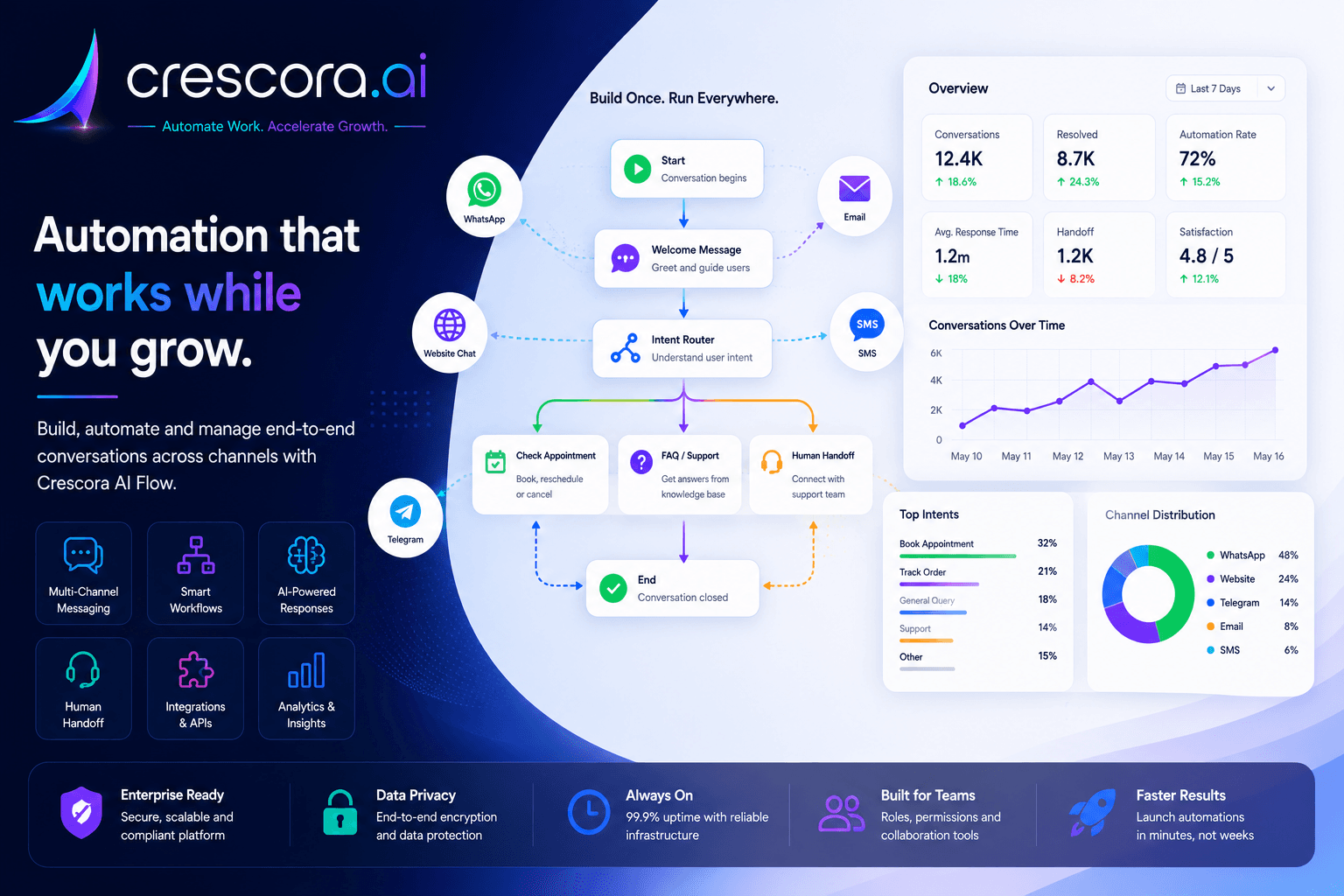
Best workflow automation examples for service businesses
Built for hospitals, schools, real estate, coaching centers, diagnostics, agencies, clinics, and service teams that need faster execution with better control.

Section

Why workflow automation matters for service businesses

Service businesses do not struggle only because customers ask questions. They struggle because every customer request creates a chain of manual actions. If those actions are delayed or missed, the business loses leads, revenue, trust, and team productivity.

Enquiries need fast action

A customer who does not receive a quick next step may contact another provider.

Manual coordination slows teams down

Staff lose time switching between chats, calls, spreadsheets, payment links, documents, and internal follow-ups.

Follow-ups are easy to forget

Without automation, teams miss callbacks, reminders, payment nudges, renewals, and inactive leads.

Managers lack visibility

Owners cannot clearly see where customers drop off, which team is overloaded, or which workflow is delaying revenue.

Section

Best workflow automation examples for service businesses

1. Lead capture and qualification workflow

Capture name, phone number, requirement, source, location, budget, service interest, and preferred callback time, then qualify the lead and notify the right team.

2. Appointment booking workflow

Let the customer select department, service, date, time, and preferred staff or specialist, then confirm the booking, store the appointment details, and send reminders before the visit.

3. Customer follow-up workflow

After an enquiry, schedule follow-ups, send reminders, ask for callback preference, recover silent customers, and escalate serious leads to humans.

4. Payment reminder and confirmation workflow

Send payment instructions, remind pending customers, verify payment status where configured, update the record, and inform the business team when action is needed.

5. FAQ and support deflection workflow

Answer repeated questions using approved business knowledge. If the answer is unavailable, sensitive, or account-specific, collect context and route the case to a human team.

6. Document collection workflow

Ask customers to upload required documents, check whether the minimum set is received, and route incomplete or review-needed cases to staff.

7. Human handoff workflow

Detect urgent, complex, high-value, angry, or sensitive conversations and transfer them to the right team with collected details and conversation context.

8. Renewal and re-engagement workflow

Identify customers who need renewal, follow-up, repeat booking, package upgrade, or reactivation, then send timely messages and route interested customers to the team.

9. Internal task routing workflow

Classify customer requests and assign them to sales, support, billing, operations, admissions, front desk, or management review.

10. Feedback and review collection workflow

After service completion, ask for feedback, capture rating, route complaints to support, and send happy customers toward testimonials or review requests.

Section

Example service business workflow map

A practical workflow map can look like this: Customer enquiry to intent classification to detail capture to record created to team notified to appointment, payment, or document step to follow-up scheduled to human handoff if needed to outcome tracked.

This makes the work visible from intake to resolution instead of leaving staff to coordinate everything manually across disconnected tools.

Next step

Need workflow automation that actually fits service operations?

Start with the customer journeys creating the most delay today, prove value on one workflow, then expand into lead capture, appointments, support, payments, and renewals.

Section

How Crescora AI connects these workflows

Crescora AI connects the full customer journey instead of automating one isolated reply. A request can move from intake to classification, data capture, record creation, notification, payment, scheduling, team assignment, human handoff, and outcome tracking in one controlled workflow.

Capture

Collect customer details, requirement, source, service type, location, budget, documents, and preferred time.

Classify

Use AI and business rules to understand intent, urgency, department, risk, or customer stage.

Automate

Trigger confirmations, reminders, payment steps, document requests, FAQs, callbacks, and follow-ups.

Route

Send each request to sales, support, admissions, billing, operations, front desk, or management review.

Escalate

Move urgent, high-value, unresolved, or sensitive cases to humans with full context.

Track

Measure leads, bookings, payments, support cases, handoffs, drop-offs, and workflow outcomes.

Section

Workflow automation with control, not random AI actions

Service businesses should not automate blindly. Crescora AI helps teams define the exact path each request should follow, where AI can assist, when humans should review, and how managers can track the outcome.

Business-rule based workflows

Define what happens for each enquiry, support request, appointment, document, payment, or follow-up.

Human review for sensitive cases

Keep urgent, high-value, risky, or unclear decisions under human control.

Operational visibility

Dashboards and workflow tracking help teams see queues, bottlenecks, escalations, and outcomes.

Scalable customer operations

Automate repeated work while staff focus on judgment, relationships, quality, and closing revenue.

Related resources

Explore More Workflow Automation Resources

Open the next workflow, template, comparison, or pricing page for your service-business rollout.

Service Business Automation Solutions

Automate enquiries, bookings, payments, documents, support, handoffs, and follow-ups.

Explore Service Automation

Workflow Automation Templates

Start with ready-to-customize workflows for leads, appointments, FAQs, reminders, and payments.

View Templates

Crescora AI vs Basic Chatbots

See why workflow automation is stronger than simple auto-reply bots.

Compare Crescora AI

Lead Automation Solutions

See how enquiry capture, qualification, routing, and follow-up work together.

Explore Lead Automation

Pricing

See rollout options for workflow automation, channel support, handoff, and business operations.

View Pricing

FAQ

Frequently asked questions

These are the common questions service businesses ask before rolling out workflow automation.

What kinds of service-business workflows can be automated first?

Most teams start with the workflows causing repeated manual work or revenue leakage: lead capture, appointment booking, follow-ups, payment reminders, support routing, document collection, and renewals.

Why is workflow automation better than a simple chatbot?

Because the business value is in the next action after the reply. Workflow automation handles records, assignments, reminders, documents, payments, handoff, and outcomes instead of only answering the first message.

Can one platform handle different workflows for different teams?

Yes. Service businesses often need different workflows for sales, support, admissions, billing, operations, or front desk teams. Crescora AI can route requests based on business rules and team ownership.

What happens when a workflow needs human judgment?

Urgent, sensitive, high-value, or unclear cases can be escalated to the right human team with customer context, previous steps, and the reason the case needs review.

How do managers measure whether workflow automation is working?

Track leads captured, bookings completed, reminders sent, payments recovered, support outcomes, handoff volume, drop-offs, and team response times after rollout.

Next step

Ready to automate your service business workflows?

Use Crescora AI to capture enquiries, automate follow-ups, book appointments, send reminders, collect documents, route support cases, and track every customer outcome from first message to final resolution.

For hospitals, schools, real estate, coaching centers, diagnostics, clinics, agencies, finance, insurance, and service businesses.
